Garruline Single Line: A Creative Font for Sketch Pens & Foil Quill
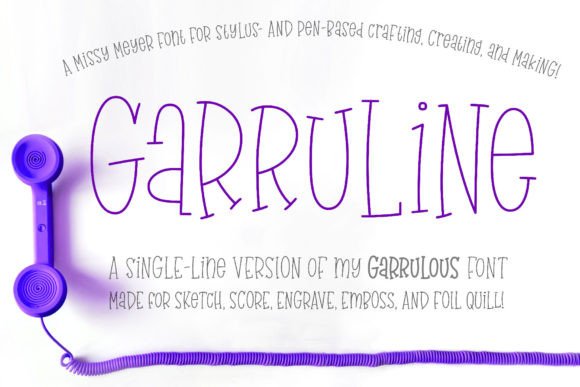
If you work with a sketch pen, foil quill, or engraving tool, you know the frustration. Most fonts are designed for printing, filled with solid shapes that your machine interprets as a complex, time-consuming fill task. Garruline (single Line) changes the game. This isn't a traditional typeface; it's a specialized creative font engineered from the ground up for single-line output. Based on the charming, hand-drawn Garrulous serif, Garruline translates that organic warmth into a clean, single-stroke format perfect for modern making.
More Than a Font: A Precision Tool for Modern Crafters
At its core, Garruline is a premium font built for specific, high-demand applications. Think of it as a precision instrument for your creative projects. When you select Garruline in your design software, you're not choosing a standard serif font for a printed document. You're loading a set of vector paths that your cutting machine or drawing tool will follow with a single, continuous line. This results in crisp, clean, and incredibly efficient output. Whether you're etching a logo onto leather, sketching a wedding invitation, or adding foil details to packaging, the line quality is consistent and professional.
The personality of Garruline is approachable and authentic. It carries the slight imperfections and flow of hand-lettering, giving your work a human touch that sterile, geometric fonts lack. This makes it an excellent handwritten font alternative for projects where you want warmth without sacrificing clarity. The two uppercase-height alphabets, including many lowercase-style letters in the lowercase set, offer surprising versatility. You can create dynamic hierarchies within a single headline or monogram, making it a powerful display font for logos, titles, and impactful statements.
Where Garruline Truly Shines: Practical Applications
Understanding where to use a single-line font like Garruline is key to leveraging its full potential. It's not for word processing or standard printing. Its strength lies in fabrication and embellishment. Here’s where it becomes an indispensable part of your design assets:
- Paper Crafting & Stationery: Use it with sketch pens to draw elegant addresses on envelopes, create intricate card sentiments, or design monogrammed tags. The built-in double-letter ligatures ensure your script looks naturally connected, avoiding the awkward spacing that can plague other fonts.
- Foil Quilling & Embossing: The single-stroke path is ideal for foil quills and embossing folders. It creates a sharp, defined impression or foil line that is both delicate and legible, perfect for packaging design, luxury branding, and special event invitations.
- Engraving & Laser Work: For engravers and laser cutters, Garruline provides clean vector outlines. You can easily adjust the stroke weight in programs like Adobe Illustrator or Inkscape to control the depth and width of your engraved line, making it suitable for everything from jewelry to signage.
- Digital Design Mockups: As a modern typography asset, Garruline is fantastic for creating realistic mockups of physical products. Show a client how their logo will look sketched on a notebook or foiled on a business card before a single machine is turned on.
- Infusible Ink & Sublimation: The clean, continuous line works beautifully with infusible ink pens, allowing you to draw permanent, vibrant designs onto compatible materials like coasters and tote bags.
For entrepreneurs and small business owners, Garruline offers a way to elevate branded merchandise and packaging without the high cost of outsourcing. A small coffee shop can sketch its logo onto paper cups; a jewelry maker can engrave a custom font onto pieces. This level of customization builds a cohesive and memorable brand identity.
Integrating Garruline into Your Design Workflow
Adopting a specialty font like Garruline requires a slight shift in mindset. You're not just typing; you're preparing a design for physical execution. Here’s how to approach it practically:
Evaluate the Project Fit: First, ask if your project needs a drawn or engraved line. If you're creating a social media graphic for the screen, a standard sans serif font is likely better. If you're making a physical item, Garruline is your tool. Its character supports projects that value craftsmanship, personalization, and a tactile quality.
Master the Technical Setup: Although Garruline is distributed as TTF files, its characters are OpenType-coded and PUA-encoded. This means you can access all 530+ glyphs, including extended Latin characters and ligatures, easily in most design software. In a vector program, the key is to apply a stroke and remove the fill. This turns the solid letterform into an outline path, which your machine will then draw. You can then adjust the stroke weight to your preference.
Consider Font Pairing Thoughtfully: Garruline's personality is strong. Pair it with a clean, simple sans serif font for body text in a brochure layout to create contrast and maintain readability. For a cohesive, handcrafted aesthetic, you might pair it with a simple monoline script font. The goal is balance—let Garruline be the star for headlines and key messages, and use a more neutral partner for longer passages.
Test Before You Commit: Always do a small test cut or draw on your material. Paper weight, pen nib size, foil type, and material surface all affect the final outcome. A quick test ensures the line weight and style translate as expected, saving you time and materials on the final piece.
In a digital world saturated with pixel-perfect graphics, Garruline (single Line) bridges the gap to physical creation. It empowers designers, crafters, and business owners to produce professional, customized work that stands out through its inherent artistry and technical precision. It’s not just another font in your library; it’s a gateway to a more hands-on, personalized form of design.